
Phishing remains one of the most common online security threats because it targets people rather than just computers. A phishing email, text message, or fake website is designed to make you believe that a trusted company, bank, delivery service, social network, or business platform is contacting you.
The message may ask you to sign in, verify your identity, confirm a payment, download a file, or take urgent action. If the message is fake, following those instructions could expose your password, payment information, personal data, or business account.
Learning how to recognize suspicious messages is one of the most practical ways to improve your online safety. This guide explains the most common warning signs of phishing and the steps you can take before clicking a link or entering sensitive information.
What Is Phishing?
Phishing is a type of online scam in which an attacker pretends to be a trusted person or organization in order to steal information or convince someone to perform an unsafe action.
A phishing attempt may arrive through:
- SMS or text message
- Social media
- Messaging applications
- Fake customer support chats
- Fraudulent websites
The attacker often tries to create a sense of urgency so that the victim reacts quickly without checking whether the message is genuine.
Why Phishing Messages Can Be Difficult to Recognize
Modern phishing messages can look professional. They may use company logos, familiar colors, realistic formatting, and language that resembles legitimate customer support.
Some messages may also include your name, email address, company name, or other information gathered from public sources.
For this reason, you should not assume that a message is genuine simply because it looks professional or contains some correct personal information.
1. Be Suspicious of Unexpected Urgent Messages
Phishing attempts often try to pressure you into acting immediately.
You may receive messages such as:
- Your account will be suspended today
- Your password expires immediately
- A payment has failed
- Your package cannot be delivered
- Your business page has received a violation
- Unusual activity has been detected
Legitimate companies may sometimes send urgent security notifications, so urgency alone does not prove that a message is fake. However, it is a strong reason to slow down and verify the situation independently.
Instead of clicking the link in the message, open the official application or type the official website address directly into your browser.
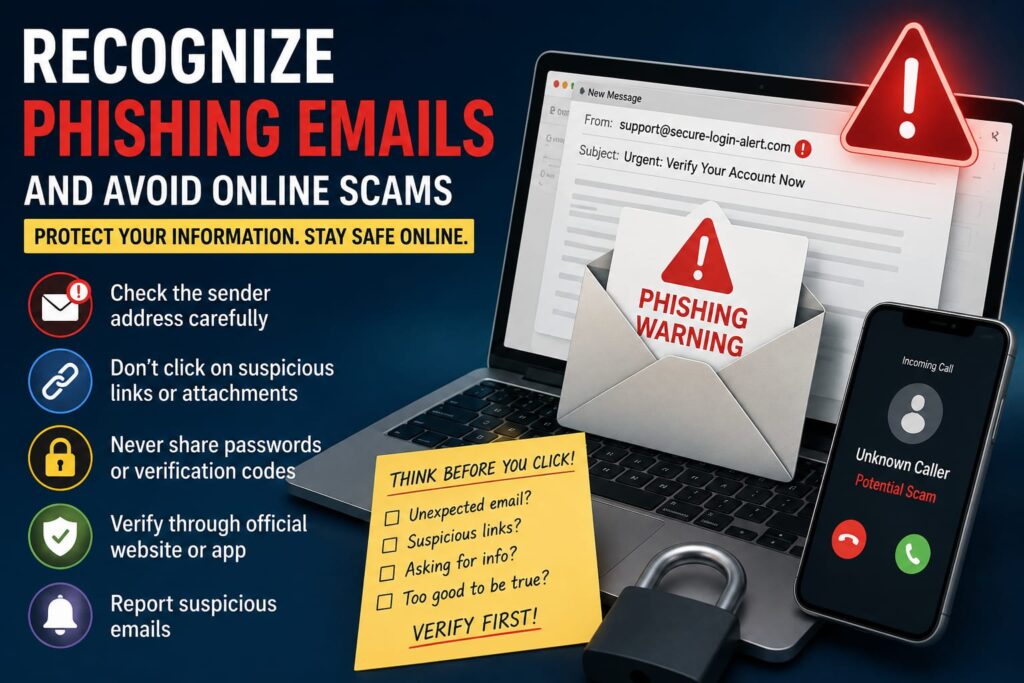
2. Check the Sender Address Carefully
A display name can be misleading. An email may show the name of a familiar company while actually being sent from an unrelated address.
Before trusting a sensitive email, check the complete sender address.
Watch for:
- Misspelled company names
- Unusual domain names
- Extra numbers or letters
- Free email addresses claiming to represent large businesses
- Domains that only look similar to the real one
Attackers sometimes register domains that differ from legitimate websites by only one or two characters, so careful reading is important.
3. Inspect Links Before You Open Them
A link can display one address while taking you to another website.
On a computer, you can often place your cursor over a link to preview its destination. On a mobile device, some applications allow you to press and hold the link to see more information before opening it.
If the destination looks suspicious, do not continue.
When a message concerns an important account, the safest option is often to visit the official website independently instead of using the link contained in the message.
4. Look for Fake Login Pages
Many phishing campaigns lead to fake login pages designed to resemble familiar services.
The page may copy the appearance of an email provider, bank, social media platform, cloud service, or website hosting company.
Before entering your password, check the address bar carefully.
A secure-looking design or padlock icon does not automatically prove that the website belongs to the company you expect. The domain name itself still needs to be correct.
5. Never Share Verification Codes Unexpectedly
Two-factor authentication codes, one-time passwords, and security confirmation codes are highly sensitive.
If someone contacts you and asks you to send a verification code that was just delivered to your phone or email, do not automatically provide it.
An attacker may already know your password and may be trying to complete the login process.
Only enter a security code when you personally initiated the login or account action and fully understand what the code is confirming.
6. Be Careful with Email Attachments
Unexpected attachments can contain harmful files or lead to unsafe websites.
Be particularly cautious when you receive unexpected:
- Invoices
- Payment documents
- Compressed files
- Office documents
- Installation files
- Unknown download links
If an attachment appears to come from a customer, supplier, colleague, or company but you were not expecting it, verify the message through another trusted communication method before opening the file.
7. Watch for Requests for Sensitive Information
Be cautious when a message asks for information such as:
- Your password
- Bank card details
- PIN numbers
- Recovery codes
- API keys
- Private account credentials
- Government identification information
Legitimate support teams generally do not need your account password in order to provide normal customer service.
If you are unsure, contact the organization through a phone number, application, or website that you already know is genuine.
8. Do Not Trust a Message Only Because It Knows Your Name
Personalized phishing messages can appear more convincing because they contain accurate information about the recipient.
However, names, job titles, business details, usernames, and email addresses may be publicly available through websites, social media profiles, data breaches, or business directories.
The presence of your name does not prove that the sender is legitimate.
9. Be Careful with Fake Security Alerts
Some phishing messages pretend to protect you from a security problem.
For example, a message may claim that someone has signed in to your account and instruct you to click a button immediately.
This can be confusing because real companies also send security alerts.
The safest response is to open the official application or website directly and check your account activity there.
If the alert is genuine, the same security information will often be visible inside your account.
10. Watch for Fake Payment and Invoice Messages
Businesses are frequently targeted with fake invoices, payment requests, and billing notifications.
An attacker may pretend to be:
- A supplier
- A hosting company
- A software provider
- A delivery company
- A business partner
- A manager or executive
Before sending money or changing payment details, verify the request through a known contact method.
This is especially important if someone suddenly asks you to send money to a new bank account or payment address.
11. Be Suspicious of Offers That Seem Too Good to Be True
Phishing does not always use fear. Some scams use excitement instead.
You may receive a message claiming that you have:
- Won a prize
- Received a large refund
- Qualified for an investment opportunity
- Been selected for an exclusive reward
- Received free products or money
If you never entered a competition or requested an offer, be particularly cautious.
Do not provide payment details or personal information simply to claim an unexpected reward.
12. Be Careful with Shortened URLs
Shortened links are useful and legitimate in many situations, but they can also hide the final destination.
If an unexpected message contains a shortened link and asks you to log in or provide sensitive information, verify the sender before opening it.
For important accounts, it is safer to navigate to the official website manually.
13. Confirm Requests Through Another Communication Channel
If someone you know sends an unusual request, verify it using another method.
For example, if a colleague suddenly asks you to transfer money or send confidential information, contact that person through a phone number or communication channel you already trust.
This simple step can help protect against compromised email accounts and impersonation attempts.
14. Use Multi-Factor Authentication
Multi-factor authentication adds another layer of protection beyond your password.
If you accidentally enter your password into a phishing website, an additional authentication factor may make it more difficult for an attacker to access the account.
However, multi-factor authentication does not make phishing impossible. Some sophisticated attacks may also attempt to steal verification codes or trick users into approving login requests.
For this reason, you should still carefully verify every unexpected login prompt.
15. Keep Your Browser and Devices Updated
Security is stronger when your devices and applications are up to date.
Regular updates may include fixes for known security vulnerabilities and improvements to phishing and malware protection.
Keep your:
- Web browser updated
- Phone operating system updated
- Computer operating system updated
- Email application updated
- Security software updated
What Should You Do If You Clicked a Phishing Link?
Clicking a suspicious link does not always mean that your account has been compromised. However, you should evaluate what happened next.
If you only opened a webpage but did not download anything or enter information, close the page and continue monitoring your account.
If you entered your password, change it immediately from the official website or application.
You should also:
- Enable multi-factor authentication
- Sign out unfamiliar sessions
- Review recovery information
- Check connected applications
- Change reused passwords on other services
What Should You Do If You Shared a Verification Code?
If you accidentally gave someone a login verification code, immediately access the official account and change your password.
Review active sessions and sign out any device you do not recognize.
Also check whether the attacker changed your recovery email address, phone number, security settings, or other account information.
What Should You Do If You Downloaded a Suspicious File?
If you downloaded or opened a suspicious file, disconnecting from sensitive accounts and scanning the device with reputable security software may be appropriate.
Avoid entering important passwords until you are confident that the device is safe.
If the device belongs to a company, contact the person responsible for IT or cybersecurity before attempting major changes.
Common Signs of a Phishing Message
No single warning sign proves that a message is fraudulent, but several warning signs together should make you cautious.
- Unexpected urgency
- Suspicious sender address
- Unfamiliar website domain
- Requests for passwords or verification codes
- Unexpected attachments
- Unusual payment requests
- Threats of immediate account closure
- Unexpected prizes or refunds
- Poorly matched branding or formatting
- Requests to bypass normal company procedures
A Simple Phishing Safety Checklist
Before responding to an unexpected message, ask yourself:
- Was I expecting this message?
- Is the sender address correct?
- Does the link lead to the official domain?
- Is the message trying to create panic?
- Is someone asking for sensitive information?
- Can I verify the request another way?
- Can I open the official app or website directly instead?
Taking a few extra seconds to answer these questions can prevent many avoidable mistakes.
Frequently Asked Questions
Can phishing emails look completely professional?
Yes. A phishing message may use professional design, correct logos, familiar language, and realistic formatting. Appearance alone is not enough to confirm that a message is legitimate.
Is every email containing a link dangerous?
No. Most legitimate online services use links in normal communication. The important step is to evaluate the sender, purpose, destination, and context before entering sensitive information.
Can a phishing attack happen through text messages?
Yes. Fraudulent text messages may contain fake delivery updates, payment notifications, account alerts, or other links designed to collect personal information.
What if a suspicious email appears to come from someone I know?
The person’s account may have been compromised or their identity may be impersonated. Verify unusual requests through another trusted communication method before responding.
Does two-factor authentication protect against phishing?
Two-factor authentication can provide valuable additional protection, but users must still avoid sharing verification codes or approving unexpected login requests.
Should I reply to a phishing email to ask whether it is real?
It is generally safer not to engage with a suspicious sender. Contact the organization through its official website, application, or a trusted contact method instead.
Final Thoughts
Phishing succeeds when attackers convince people to act before they have time to verify a message. Developing the habit of checking sender addresses, website domains, login requests, payment instructions, and unexpected attachments can greatly improve your online safety.
When an email or message creates urgency, do not let the pressure make the decision for you. Open the official service independently, verify the situation, and protect sensitive information such as passwords and security codes.
A few seconds of careful checking can prevent the loss of an important account, personal information, business data, or money.