
Your email account is one of the most important parts of your digital life. It is often connected to social media, banking, cloud storage, shopping accounts, business tools, website administration, and password recovery systems.
If someone gains access to your email, they may be able to reset passwords for other services, read private conversations, steal sensitive information, or impersonate you.
Fortunately, improving email security does not require advanced technical skills. A few practical steps can dramatically reduce the risk of unauthorized access. This guide explains how to strengthen your email account and keep it safer over the long term.
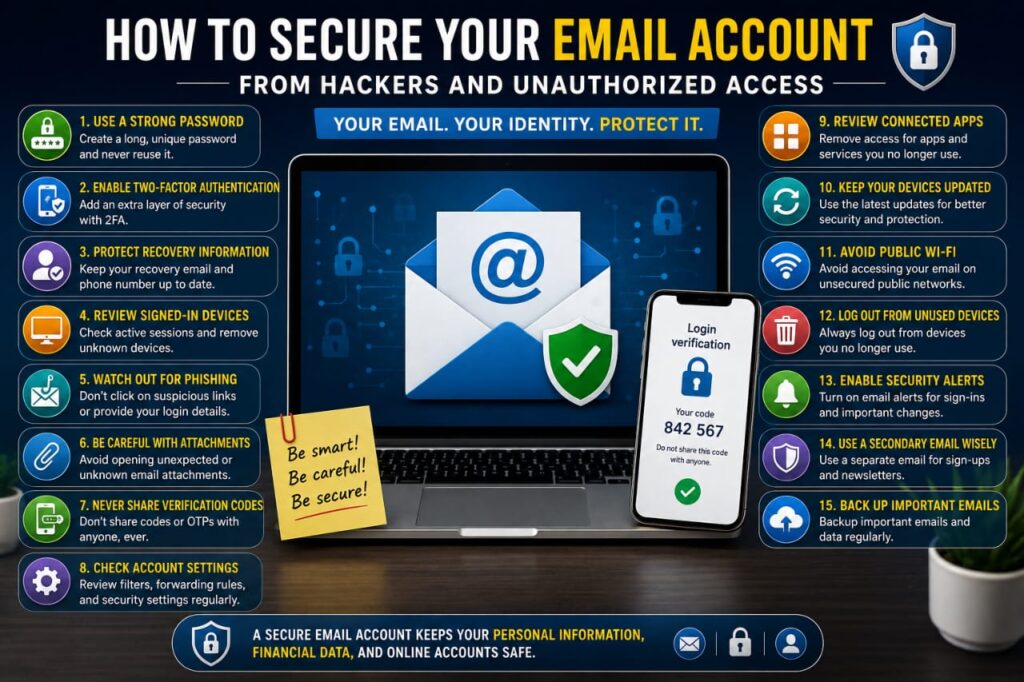
1. Use a Strong and Unique Password
Your email password should be different from every other password you use.
If you reuse the same password across multiple websites and one of those services suffers a data breach, attackers may try the exposed password on your email account.
A strong email password should be:
- Long
- Unique
- Difficult to guess
- Unrelated to public personal information
- Different from passwords used on other services
A reputable password manager can help you create and store a strong password without needing to memorize every credential.
2. Enable Two-Factor Authentication
Two-factor authentication adds an extra verification step when someone tries to sign in to your email account.
This means that even if your password is exposed, an attacker may still need another verification method.
Depending on your email provider, available options may include:
- Authenticator applications
- Security keys
- Trusted-device approval
- Biometric authentication
- One-time verification codes
For an important email account, multi-factor authentication should be considered a basic security measure.
3. Protect Your Recovery Information
Email providers often allow you to recover your account using a phone number or another email address.
These recovery methods are useful, but they also need to be protected.
Review your recovery settings periodically and make sure:
- Your phone number is current
- Your recovery email is still under your control
- Old phone numbers have been removed
- Unknown recovery addresses are not listed
If your recovery information is outdated, restoring access during an emergency can become much more difficult.
4. Review Devices That Are Signed In
Most major email services provide a list of devices or sessions that have recently accessed your account.
Check this list occasionally and look for devices you do not recognize.
If you find suspicious activity:
- Sign out unfamiliar devices
- Change your password
- Review two-factor authentication
- Check recovery information
- Review recent security activity
Keep in mind that some legitimate devices may appear under unfamiliar names, so verify carefully before taking action.
5. Learn to Recognize Phishing Emails
Phishing is one of the most common ways attackers try to steal email passwords.
A phishing message may claim that:
- Your account is about to be suspended
- Your password has expired
- Someone logged into your account
- A payment failed
- You need to verify your identity
The message may contain a button that leads to a fake login page designed to collect your password.
Instead of clicking unexpected login links, open your email provider’s official website or application directly.
6. Check the Sender Address Carefully
An email may display a familiar company name while actually coming from a completely different address.
Before trusting an important message, inspect the full sender address.
Watch for:
- Misspelled domains
- Unexpected extra characters
- Unusual domain endings
- Free email addresses pretending to represent large companies
- Addresses that only resemble the official domain
A professional-looking logo does not prove that the message is genuine.
7. Be Careful with Email Attachments
Email attachments can contain malicious software or documents designed to trick users into enabling unsafe features.
Be cautious with unexpected:
- Invoices
- Compressed files
- Office documents
- Installation files
- Payment documents
- Unknown download links
If a file appears to come from someone you know but the message seems unusual, verify with that person through another trusted method before opening it.
8. Never Share Your Email Verification Codes
One-time passwords and security codes should never be shared casually.
If someone contacts you and asks for a code that has just arrived in your email or phone, be suspicious.
An attacker may already know your password and may be trying to complete the login process.
Only enter security codes when you personally started the login or recovery process.
9. Use Different Email Addresses for Different Purposes
Some people find it useful to separate important communication from newsletters, promotions, and low-priority registrations.
For example, you may choose to maintain:
- A primary email for banking and important accounts
- A work or business email
- A separate address for newsletters and promotions
This is not required for everyone, but it can reduce exposure of your most important email address to unnecessary websites.
10. Be Careful When Using Public Computers
A public or shared computer may store login information, browser history, cookies, or downloaded files.
Avoid accessing your primary email account from public devices whenever possible.
If you must use one:
- Do not save the password
- Sign out completely afterward
- Avoid downloading sensitive attachments
- Do not approve the computer as a trusted device
Using your personal device is usually safer for important email access.
11. Avoid Staying Logged In on Devices You No Longer Use
Old smartphones, tablets, computers, and browsers may remain connected to your email account long after you stop using them.
Review active sessions and remove devices you have sold, lost, replaced, or given to someone else.
Before selling or giving away a device, sign out of your accounts and perform an appropriate factory reset or secure wipe.
12. Review Connected Applications
Third-party applications may have permission to access parts of your email account or related profile information.
Over time, you may forget which applications you previously authorized.
Review connected apps periodically and remove access for services that you no longer use or recognize.
Reducing unnecessary third-party access can improve both privacy and security.
13. Keep Your Browser and Email App Updated
Your email security also depends on the software you use to access it.
Keep your:
- Browser updated
- Email app updated
- Phone operating system updated
- Computer operating system updated
Updates may include important security fixes for known vulnerabilities.
14. Check Email Forwarding Rules
Some email services allow messages to be automatically forwarded to another address.
This is useful when you intentionally configure it, but unauthorized forwarding can expose private messages without being immediately obvious.
Review forwarding and filter rules occasionally, especially if you suspect your account has been accessed by someone else.
Remove any rule you do not recognize.
15. Review Filters and Automatic Rules
Attackers who gain access to an email account may create filters that hide security warnings or redirect important messages.
Check your account settings for unexpected rules that:
- Delete specific messages
- Archive security alerts
- Forward emails automatically
- Mark messages as read
- Move important messages to unusual folders
If you find a rule you did not create, remove it and review the rest of your account security immediately.
16. Be Careful with Account Recovery Messages
If you receive a password-reset email that you did not request, someone may be trying to access your account or may have entered your address by mistake.
Do not panic, but do not ignore repeated suspicious recovery activity either.
Open the official account-security page directly and review recent activity if necessary.
17. Watch for Unexpected Login Notifications
Email providers may notify you when a new device or location signs in.
If you recognize the activity, no action may be necessary.
If you do not recognize it:
- Secure the account immediately
- Change the password
- Sign out other sessions
- Review recovery information
- Check connected apps
- Confirm two-factor authentication settings
18. Do Not Use Your Email Password on Other Websites
Your primary email password should be completely separate from passwords used elsewhere.
This is especially important because access to your email may allow password recovery for multiple other accounts.
Treat the password for your primary email as one of your most important credentials.
19. Keep Backup Codes Secure
Some two-factor authentication systems provide backup or recovery codes.
These codes may allow account access if your normal authentication device is unavailable.
Because backup codes can provide powerful access, store them securely and do not share them publicly.
Avoid keeping them in an unprotected screenshot or document that can easily be accessed by someone else.
20. Protect the Device You Use for Email
Even a well-protected email account can become vulnerable if your phone or computer is not secure.
Protect your devices with:
- A strong screen lock
- Operating system updates
- Trusted applications
- Secure browser settings
- Device encryption where supported
Never leave an unlocked device containing sensitive email unattended in a public place.
What Should You Do If Your Email Account Is Hacked?
If you believe someone has gained unauthorized access, act quickly.
Start by changing the password from a trusted device.
Then:
- Sign out unknown devices
- Review recovery information
- Check two-factor authentication settings
- Remove unknown forwarding rules
- Review filters
- Check connected applications
- Inspect recently sent emails
If you reused the compromised password on other websites, change those passwords as well.
Check Your Sent Folder
If your account was compromised, review your sent messages.
An attacker may have used your account to send phishing links, spam, or fraudulent requests to your contacts.
If this happened, consider warning affected contacts through a trusted communication method.
Check Your Deleted and Archived Messages
An attacker may try to hide evidence by deleting security notifications or moving messages into another folder.
Review:
- Trash
- Archive
- Spam
- Custom folders
This may help you understand what happened and whether important account settings were changed.
What If You Can No Longer Sign In?
If your password no longer works, use the official account recovery process provided by your email service.
Avoid paying unknown individuals who claim they can recover the account through unofficial methods.
Follow the provider’s official recovery instructions and provide accurate information when requested.
Common Email Security Mistakes
Many email compromises are linked to simple security mistakes.
Common examples include:
- Reusing passwords
- Using weak passwords
- Ignoring two-factor authentication
- Clicking fake login links
- Sharing verification codes
- Leaving old devices logged in
- Ignoring recovery settings
- Granting unnecessary third-party access
- Opening unexpected attachments
A Simple Email Security Checklist
Use this checklist to review your email security:
- Use a strong unique password
- Enable two-factor authentication
- Review recovery phone and email
- Check active sessions
- Remove old devices
- Review connected apps
- Check forwarding settings
- Review email filters
- Keep your devices updated
- Protect backup codes
Frequently Asked Questions
Why is my email account so important?
Your email is often connected to password recovery for many other services. If someone controls your email, they may attempt to gain access to other accounts associated with it.
Should I change my email password regularly?
You should change it immediately if there is evidence of compromise, if it was reused elsewhere, or if someone else may know it. A strong unique password is more important than changing a secure password on an arbitrary schedule.
Can someone hack my email without knowing my password?
Unauthorized access can occur in several ways, including stolen login sessions, phishing, compromised devices, malicious apps, or account-recovery abuse. This is why multiple security layers are important.
Is two-factor authentication necessary?
For an important email account, two-factor authentication provides valuable additional protection and is strongly recommended when available.
What should I do if I receive a password reset email I did not request?
Do not use suspicious links. Open the official account-security page directly and review recent activity, especially if you receive repeated unexpected recovery messages.
Is it safe to stay signed in to email on my personal phone?
It can be reasonable if the phone itself is well protected with a strong screen lock, updates, and other security measures. Remove access promptly if the device is lost or stolen.
Final Thoughts
Your email account is more than a place for messages. It is often the central recovery point for your entire online identity.
Using a unique password, enabling two-factor authentication, reviewing recovery information, checking active sessions, and avoiding phishing links can significantly strengthen your protection.
Spend a few minutes reviewing your main email account today. A small amount of preventive work can help protect your personal information, financial accounts, business tools, and other important online services from unauthorized access.