
Online shopping has made it easier than ever to compare products, find discounts, order groceries, purchase electronics, and buy almost anything without leaving home. However, the convenience of online shopping also creates opportunities for fake stores, phishing websites, payment scams, account theft, and misleading offers.
Safe online shopping does not require advanced technical knowledge. Most risks can be reduced by checking websites carefully, protecting your payment information, using secure accounts, and avoiding deals that appear suspicious.
This guide explains practical steps you can follow to shop online more safely and protect your money, personal information, and digital accounts.
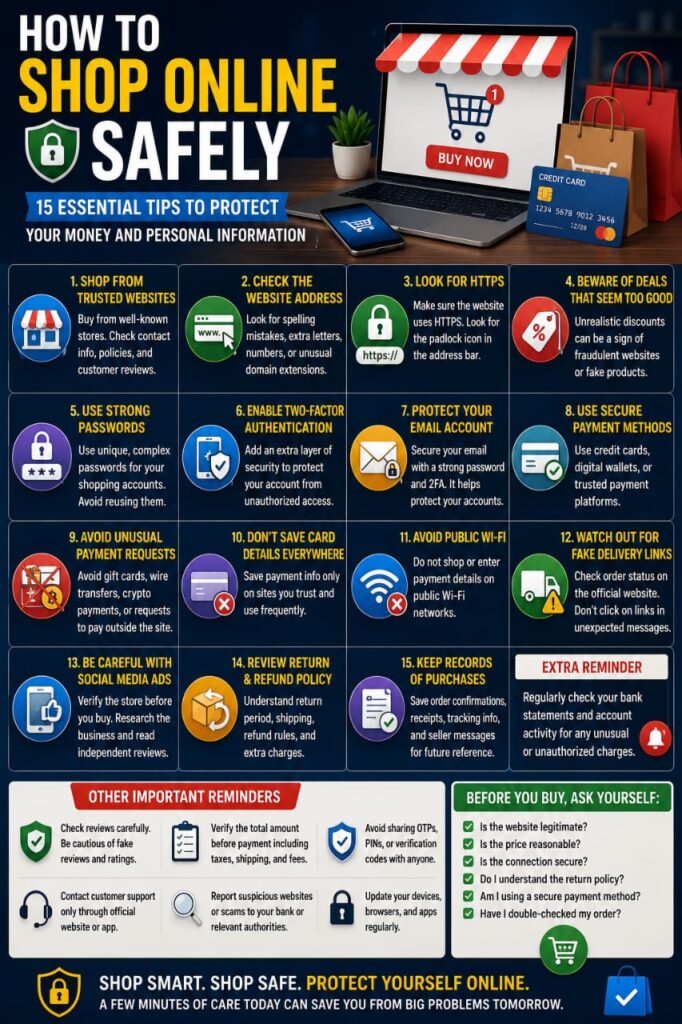
1. Shop from Websites You Trust
Whenever possible, purchase from established stores or websites you already know.
If you discover an unfamiliar online store, take a few minutes to investigate it before entering personal or payment information.
Look for:
- A clear business name
- Contact information
- Return and refund policies
- Shipping information
- Terms and privacy information
- A consistent and professional website
A professional design alone does not prove that a store is legitimate, so consider several factors together.
2. Check the Website Address Carefully
Scammers sometimes create websites with addresses that closely resemble popular stores.
A fraudulent domain may contain:
- A misspelled brand name
- An extra letter
- An unexpected number
- An unusual domain extension
- Additional words designed to look official
Before entering payment details, carefully check that you are on the website you intended to visit.
3. Look for HTTPS
Modern shopping websites should normally use HTTPS, which helps encrypt information transmitted between your browser and the website.
You can usually identify HTTPS by checking the beginning of the website address and the browser’s security indicators.
However, HTTPS alone does not prove that a website is trustworthy. Fraudulent websites can also use encrypted connections.
Treat HTTPS as one security requirement rather than complete proof of legitimacy.
4. Be Careful with Deals That Look Too Good to Be True
Extremely low prices can be used to attract people to fake shops or fraudulent payment pages.
If a popular product normally costs significantly more everywhere else, consider why one unknown seller can offer it at a dramatic discount.
Before purchasing, compare prices from several reputable stores.
Unexpected offers involving luxury products, smartphones, laptops, gift cards, or high-value electronics deserve additional caution.
5. Use Strong Passwords for Shopping Accounts
If an online store requires an account, use a password that is different from the passwords you use for email, banking, and social media.
Reusing passwords can create additional risk if one website experiences a data breach.
A strong shopping account password should be:
- Unique
- Long
- Difficult to guess
- Unrelated to public personal information
A reputable password manager can make it easier to manage unique credentials.
6. Enable Two-Factor Authentication When Available
Some shopping platforms offer two-factor or multi-factor authentication.
This feature adds an additional verification step when someone attempts to access your account.
It can be particularly useful when your shopping account stores:
- Payment methods
- Order history
- Home addresses
- Reward balances
- Gift card balances
7. Protect Your Primary Email Account
Your shopping accounts may use your email address for password resets, order confirmations, and security alerts.
If someone gains access to your email, they may attempt to reset passwords for multiple shopping services.
Protect your primary email with a unique password and two-factor authentication.
8. Use Secure Payment Methods
When shopping online, use payment methods that provide appropriate security features and transaction records.
Depending on your location and financial provider, options may include:
- Credit cards
- Debit cards with online security controls
- Trusted digital wallets
- Recognized payment platforms
Review your financial provider’s fraud protection and dispute policies so you understand what support is available if something goes wrong.
9. Avoid Sending Money Through Unusual Payment Methods
Be cautious when an unfamiliar seller insists on payment methods that are difficult to reverse or dispute.
Examples may include requests for:
- Gift card codes
- Direct transfers to unknown individuals
- Unusual cryptocurrency payments
- Payment outside the shopping platform
A seller asking you to leave a trusted marketplace and pay privately deserves additional scrutiny.
10. Do Not Save Payment Details Everywhere
Saving a payment card can make checkout faster, but storing payment information on many different websites increases the number of accounts you need to protect.
Consider saving payment details only with services you use frequently and trust.
For stores you rarely use, entering payment information when needed may reduce unnecessary storage of financial details.
11. Avoid Shopping on Public Wi-Fi When Possible
Public Wi-Fi is convenient, but unknown networks should be treated cautiously when performing financial activities.
If possible, avoid entering payment details or accessing banking services on networks you do not trust.
Using your own mobile data connection can be a better option when making sensitive transactions away from home.
12. Watch Out for Fake Delivery Messages
Scammers frequently send messages claiming that a package cannot be delivered until you pay a small fee or update your address.
The message may contain a link to a fake payment page.
If you are expecting a package, open the retailer or delivery company’s official website or application directly and check the order status there.
Do not assume a message is genuine simply because you recently placed an order.
13. Be Careful with Shopping Ads on Social Media
Social media can introduce you to legitimate businesses, but advertisements and sponsored posts can also lead to unfamiliar sellers.
Before purchasing from a store you discovered through social media:
- Check the website address
- Research the business
- Review its return policy
- Compare prices
- Look for independent information about the seller
Do not rely only on comments or testimonials displayed by the seller itself.
14. Review the Return and Refund Policy
Before buying an expensive product, read the seller’s return and refund terms.
Check:
- How many days you have to return an item
- Who pays return shipping
- Whether some products are non-returnable
- How refunds are issued
- Whether restocking fees apply
A clear return policy can help you understand what happens if the product is damaged, incorrect, or not as expected.
15. Keep Records of Important Purchases
For expensive purchases, keep useful records until the transaction is completely resolved.
This may include:
- Order confirmation
- Receipt
- Product description
- Tracking information
- Seller communication
- Return confirmation
These records may be useful if you need to contact customer support or dispute a transaction.
Check Reviews Carefully
Customer reviews can provide useful information, but they should not be your only method of evaluating a store or product.
Be cautious if:
- Every review is extremely positive
- Many reviews use nearly identical wording
- A new store suddenly has thousands of reviews
- Reviews discuss products unrelated to the listing
When possible, compare information from multiple independent sources.
Be Careful with Counterfeit Products
Products offered at unusually low prices may sometimes be counterfeit or materially different from what is advertised.
This can be particularly important for products such as:
- Electronics
- Chargers and batteries
- Cosmetics
- Luxury products
- Branded accessories
Check the seller, product description, warranty information, and price before purchasing.
Review Your Order Before Paying
Before confirming a transaction, check:
- The correct product
- Quantity
- Shipping address
- Shipping cost
- Taxes or additional fees
- Total amount
This simple review can prevent accidental purchases and help identify unexpected charges before payment.
Watch for Unexpected Subscription Charges
Some products or services may include recurring subscriptions.
Before completing checkout, check whether you are purchasing a one-time product or agreeing to recurring billing.
Pay attention to:
- Free trial conditions
- Renewal dates
- Subscription prices
- Cancellation instructions
Review Your Bank or Card Activity
After shopping online, periodically review your financial transactions.
If you notice a charge you do not recognize, investigate it promptly.
Some banks and payment providers allow users to enable transaction notifications, which can make unusual activity easier to detect.
Do Not Ignore Small Unknown Charges
An unfamiliar transaction does not need to be large to deserve attention.
If you see a charge you cannot identify, check your recent purchases and subscriptions.
If necessary, contact your bank, card issuer, or payment provider using official contact information.
Be Careful with Marketplace Sellers
Online marketplaces may include thousands of independent sellers.
Before purchasing from an individual seller, review:
- Seller history
- Product description
- Delivery expectations
- Return options
- Marketplace buyer protections
Keep conversations and payments within the marketplace when that is required for its protection policies.
Never Share One-Time Verification Codes
A legitimate purchase may sometimes require a verification code from your bank or payment provider.
Do not send that code to a stranger through chat, email, or phone.
Only enter it into the legitimate payment process that you personally initiated.
Be Careful with Customer Support Impersonation
After posting publicly about an order problem, you may receive messages from accounts pretending to represent the store.
Fake support representatives may ask for:
- Your password
- Verification codes
- Payment information
- Remote access to your device
Contact customer support through the company’s official website or app rather than trusting an unsolicited message.
What Should You Do If You Ordered from a Suspicious Website?
If you realize after purchasing that a website may be fraudulent, act quickly.
Depending on what information you provided, consider:
- Contacting your bank or payment provider
- Monitoring your transactions
- Changing a reused password
- Securing your email account
- Saving screenshots and purchase records
Follow the official dispute or fraud-reporting process provided by your financial institution.
What Should You Do If Your Shopping Account Is Hacked?
If someone gains unauthorized access to a shopping account:
- Change the password
- Sign out unfamiliar devices
- Review recent orders
- Check saved addresses
- Review saved payment methods
- Enable two-factor authentication
If unauthorized purchases were made, contact the retailer and your payment provider promptly.
Common Online Shopping Mistakes
Many shopping scams succeed because people make decisions too quickly.
Common mistakes include:
- Buying from an unknown store without checking it
- Using the same password everywhere
- Clicking fake delivery links
- Trusting extremely low prices
- Paying outside a trusted marketplace
- Sharing verification codes
- Ignoring return policies
- Shopping on unknown public Wi-Fi
- Not reviewing financial statements
A Simple Online Shopping Safety Checklist
Before completing an online purchase, ask yourself:
- Is this the correct website?
- Do I trust the seller?
- Is the price realistic?
- Is the connection secure?
- Do I understand the return policy?
- Is the payment method appropriate?
- Have I checked the total cost?
- Am I being pressured to act immediately?
Frequently Asked Questions
Is online shopping safe?
Online shopping can be convenient and reasonably safe when you use reputable stores, secure your accounts, choose appropriate payment methods, and remain alert for scams.
How can I tell whether an online store is legitimate?
Check the domain, contact information, policies, pricing, seller history, and independent information about the business. No single signal can guarantee that a store is legitimate.
Is HTTPS enough to prove a shopping website is safe?
No. HTTPS protects data transmission, but fraudulent websites can also use HTTPS. You still need to evaluate the website and seller.
What should I do if a price seems unusually low?
Compare the product with prices from reputable sellers and investigate the store before purchasing. Extremely low prices can sometimes be used to attract victims to fraudulent websites.
Should I save my card information on shopping websites?
That depends on your preferences and how much you trust the service. Avoid storing payment details unnecessarily across many different websites.
What should I do if I receive a suspicious delivery message?
Avoid the included link and check the order through the retailer or delivery company’s official website or application instead.
Final Thoughts
Safe online shopping is largely about slowing down and verifying important details before paying.
Use trusted stores, check website addresses, protect your passwords, choose secure payment methods, avoid suspicious links, and review your transactions regularly.
A few minutes of careful checking before a purchase can help protect your money, personal information, payment details, and online accounts from many common shopping scams.