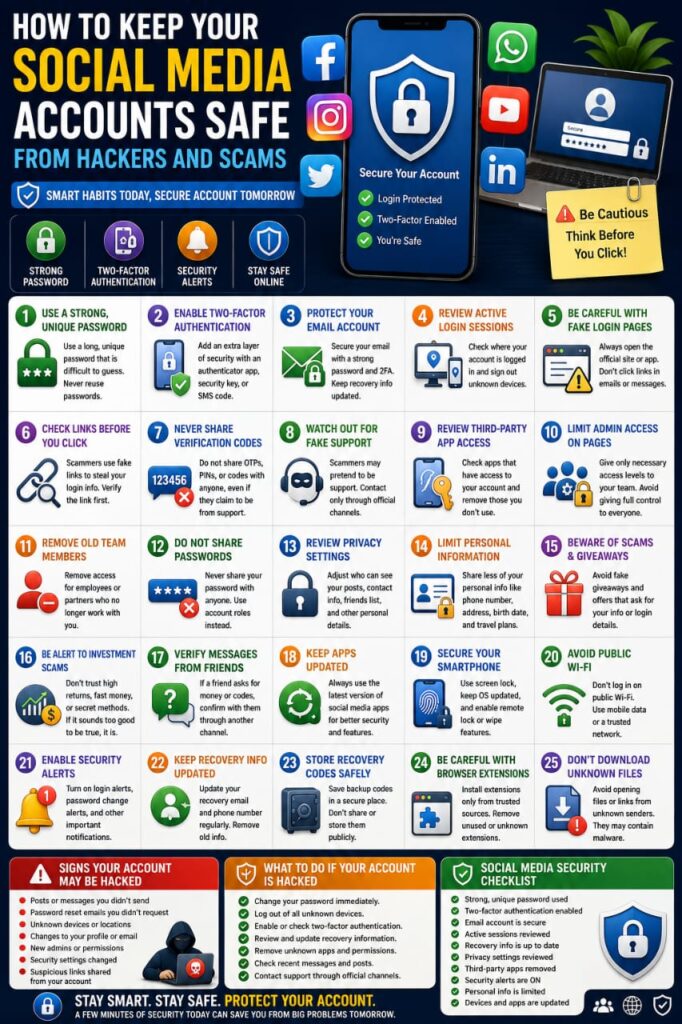

Social media accounts are connected to a large part of our digital lives. They may contain private messages, photos, personal information, business pages, saved payment methods, customer conversations, and links to other online services.
If a social media account is compromised, an attacker may impersonate you, send scam messages, change account details, steal business access, or use the account to target your friends and followers.
The good news is that many common risks can be reduced with a few practical security habits. This guide explains how to protect your social media accounts from hackers, phishing attempts, fake login pages, and other common online scams.
1. Use a Strong and Unique Password
Your social media password should be different from passwords used for email, banking, cloud storage, shopping, and other important services.
If one website suffers a data breach and you reused the same password, attackers may try those credentials on your social media accounts.
A strong password should be:
- Long
- Unique
- Difficult to guess
- Unrelated to personal information
- Different from passwords used elsewhere
A reputable password manager can help you generate and store unique passwords for each account.
2. Enable Two-Factor Authentication
Two-factor authentication adds an additional verification step when someone tries to sign in.
Even if your password becomes exposed, the additional factor can make unauthorized access more difficult.
Depending on the platform, available options may include:
- Authenticator applications
- Security keys
- Trusted-device approval
- Biometric authentication
- One-time codes
For accounts connected to business pages or large audiences, enabling two-factor authentication is especially important.
3. Protect the Email Connected to Your Account
Your email is often used for password recovery and security alerts.
If someone gains access to your email, they may attempt to reset your social media password.
Protect your email with:
- A different strong password
- Two-factor authentication
- Updated recovery information
- Regular reviews of signed-in devices
4. Review Active Login Sessions
Most major social media platforms allow you to see where your account is currently signed in.
Review this list from time to time and look for devices or locations you do not recognize.
If you find suspicious activity:
- Sign out the unknown session
- Change your password
- Review two-factor authentication
- Check recovery information
- Review recent account activity
5. Be Careful with Fake Login Pages
Phishing websites often imitate popular social media platforms.
You may receive a message claiming that:
- Your account violated a policy
- Your page will be deleted
- Your account must be verified
- A copyright complaint was received
- A security problem was detected
The message may include a link to a fake login page.
Instead of using the link, open the official app or manually visit the platform’s legitimate website.
6. Check Links Before You Click
Scammers may send links through comments, direct messages, email, or group chats.
A suspicious link may lead to:
- A fake login page
- A malicious download
- A fraudulent giveaway
- A fake support page
- A scam payment page
Check the destination carefully before opening unexpected links.
7. Never Share Verification Codes
Verification codes and one-time passwords should never be given to another person unexpectedly.
If someone asks you to send a code that just arrived on your phone or email, they may be trying to complete a login attempt.
Only enter security codes when you personally initiated the action and understand exactly what the code is confirming.
8. Watch Out for Fake Support Accounts
Scammers may create accounts that look like official customer support.
They may contact you after you post publicly about a problem and offer to help recover your account.
Fake support accounts may ask for:
- Your password
- Verification codes
- Recovery codes
- Payment information
- Remote access to your device
Contact support through the platform’s official app or website instead of trusting unsolicited messages.
9. Review Third-Party App Access
You may have connected games, business tools, analytics services, or other applications to your social media account.
Over time, you may forget which services still have access.
Review connected apps periodically and remove access for services you no longer use or recognize.
10. Limit Administrator Access to Business Pages
If you manage a business page, brand account, or professional profile, not everyone should have full administrator permissions.
Give each team member only the access needed for their role.
For example, someone who only publishes posts may not need permission to manage payments, security settings, or other administrators.
This reduces the potential impact if one team member’s account is compromised.
11. Remove Former Employees or Partners
When someone no longer works with your business, remove their access promptly.
Review:
- Page roles
- Advertising accounts
- Business managers
- Connected applications
- Shared login credentials
Old access should not remain active indefinitely.
12. Do Not Share One Account Password with a Team
Sharing one password among several people makes security harder to manage.
It becomes difficult to know who changed settings, who accessed the account, and who should be removed later.
Use individual user roles or access-management tools whenever the platform supports them.
13. Review Privacy Settings
Your privacy settings control who can see parts of your profile and activity.
Review options such as:
- Who can view your posts
- Who can see your contact information
- Who can send messages
- Who can tag you
- Who can view your friend or follower list
Use settings that match how publicly you want to use the account.
14. Limit Personal Information on Your Profile
Public personal information can make scams more convincing.
Consider whether you need to display:
- Your phone number
- Your full date of birth
- Your home address
- Your personal email address
- Your daily routine
- Your travel schedule
Reducing unnecessary public information can improve both privacy and security.
15. Be Careful with Giveaways and Prize Messages
Fake giveaways are commonly used to collect personal information or convince users to visit suspicious websites.
Be cautious if a message claims that you won something you never entered to win.
Do not provide passwords, verification codes, or payment information to claim an unexpected prize.
16. Watch Out for Investment and Money Scams
Social media is frequently used to promote fake investment opportunities, guaranteed profits, and unrealistic financial offers.
Be cautious when someone promises:
- Guaranteed returns
- Very high profits with no risk
- Instant wealth
- Secret investment methods
- Urgent opportunities available only for a short time
Financial decisions should be based on reliable information rather than pressure from strangers or viral posts.
17. Be Careful with Messages from Friends
A message from someone you know is not automatically safe.
Their account may have been compromised.
If a friend suddenly asks for money, verification codes, or account information, confirm the request through another trusted communication method.
18. Keep Your Social Media Apps Updated
Application updates may include security fixes and privacy improvements.
Install updates through the official app store for your device.
Avoid modified or unofficial versions of social media applications from unknown websites.
19. Secure Your Smartphone
Your smartphone may already be signed in to multiple social media accounts.
Protect the device with:
- A strong screen lock
- Automatic locking
- Operating system updates
- Trusted applications
- Remote device-location features
If the phone is lost or stolen, secure your social media sessions quickly.
20. Avoid Logging In on Public Computers
Public computers may store login sessions, browser data, or malicious software.
Whenever possible, avoid accessing important social media accounts from shared or public devices.
If you must use one:
- Do not save the password
- Do not mark the device as trusted
- Sign out completely
- Remove the device from active sessions afterward
21. Turn On Security Alerts
Some platforms can notify you about suspicious or unusual account activity.
Alerts may include:
- New logins
- Password changes
- New devices
- Security setting changes
Enable useful alerts so you can respond more quickly if something unexpected happens.
22. Keep Recovery Information Updated
Your recovery phone number and email address may be essential if you lose access to the account.
Remove old phone numbers and email addresses that you no longer control.
Make sure your recovery methods themselves are secure.
23. Store Recovery Codes Securely
Some platforms provide backup or recovery codes when you enable two-factor authentication.
These codes may allow account access if your usual authentication method is unavailable.
Store them in a secure place and never post or send them publicly.
24. Be Careful with Browser Extensions
Browser extensions may have permission to view or modify information on websites you visit.
Install only extensions from trusted sources and remove those you no longer need.
Review the permissions requested before installation.
25. Avoid Downloading Unknown Files from Messages
An unexpected file sent through social media may contain malicious software or misleading documents.
Be cautious with:
- Compressed files
- Installation files
- Unknown documents
- Unexpected software downloads
Verify unusual files with the sender before opening them.
What Should You Do If Your Social Media Account Is Hacked?
If you believe someone has accessed your account without permission, act quickly.
Start by changing the password from a trusted device.
Then:
- Sign out unfamiliar sessions
- Review recovery information
- Check two-factor authentication
- Remove unknown connected apps
- Review page and business permissions
- Check recently sent messages
Check for Changes to Your Account Information
An attacker may change details in order to keep access to your account.
Review:
- Email address
- Phone number
- Password
- Recovery methods
- Two-factor authentication settings
- Trusted devices
Restore any information that was changed without your permission.
Check Messages and Recent Posts
If your account was compromised, an attacker may have posted content or sent messages to your contacts.
Review recent activity and remove anything you did not create.
If scam messages were sent to friends or followers, consider warning them not to click suspicious links.
What If You Cannot Log In?
If your password no longer works, use the platform’s official account-recovery process.
Avoid paying strangers who claim they can recover the account through unofficial methods.
Follow the official instructions provided by the platform and supply accurate account information when requested.
Signs That Your Social Media Account May Be Compromised
Possible warning signs include:
- Posts you did not publish
- Messages you did not send
- Unknown devices
- Password reset emails you did not request
- Changes to your profile
- New administrators or page roles
- Security settings changed without permission
One unusual event does not always prove that an account is hacked, but suspicious activity should be investigated promptly.
Common Social Media Security Mistakes
Many account security problems begin with everyday habits.
Common mistakes include:
- Reusing passwords
- Ignoring two-factor authentication
- Clicking fake login links
- Sharing verification codes
- Giving too many people administrator access
- Keeping old team members connected
- Sharing too much personal information
- Installing unknown third-party apps
- Ignoring security alerts
A Simple Social Media Security Checklist
Use this checklist to review your account security:
- Use a unique password
- Enable two-factor authentication
- Protect your recovery email
- Review active sessions
- Remove unknown devices
- Review connected applications
- Check page and business permissions
- Review privacy settings
- Enable security alerts
- Update recovery information
- Keep your phone and apps updated
- Store recovery codes securely
Frequently Asked Questions
Can social media accounts really be hacked?
Yes. Accounts can be compromised through phishing, reused passwords, stolen sessions, malicious apps, unsafe devices, and other security problems.
Is two-factor authentication worth using?
Yes. It adds an important security layer beyond the password and can reduce the risk of unauthorized access.
What should I do if someone sends me a suspicious link?
Avoid opening it until you verify the sender and destination. If the message relates to account security, open the official platform directly instead.
Can someone hack my account by sending me a message?
Receiving an ordinary message does not usually compromise an account by itself. The greater risk comes from clicking malicious links, downloading unsafe files, or revealing login information.
Should I share my social media password with an employee?
It is safer to use the platform’s official role or permission system instead of sharing one account password among multiple people.
What is the easiest way to improve social media security?
Start with a unique password, two-factor authentication, secure recovery information, and a review of active login sessions. These steps can address many common risks quickly.
Final Thoughts
Your social media account can contain much more than posts and photos. It may also control business pages, customer relationships, private messages, advertising accounts, and important personal information.
Use unique passwords, enable two-factor authentication, review active sessions, limit unnecessary permissions, and remain cautious with suspicious messages and login links.
A few minutes spent reviewing your account security today can help protect your identity, followers, business assets, private information, and online reputation from many common threats.