
Identity theft can happen when someone obtains enough personal information to impersonate another person, access accounts, make fraudulent purchases, open financial services, or misuse sensitive records.
In today’s digital world, personal information can be exposed through phishing attacks, weak passwords, data breaches, stolen devices, unsafe websites, malicious applications, or careless sharing on social media.
Although no security method can eliminate every possible risk, a combination of good digital habits, account protection, careful monitoring, and limited information sharing can significantly reduce your exposure.
This guide explains practical steps you can take to protect your identity, personal information, financial accounts, and online activity.
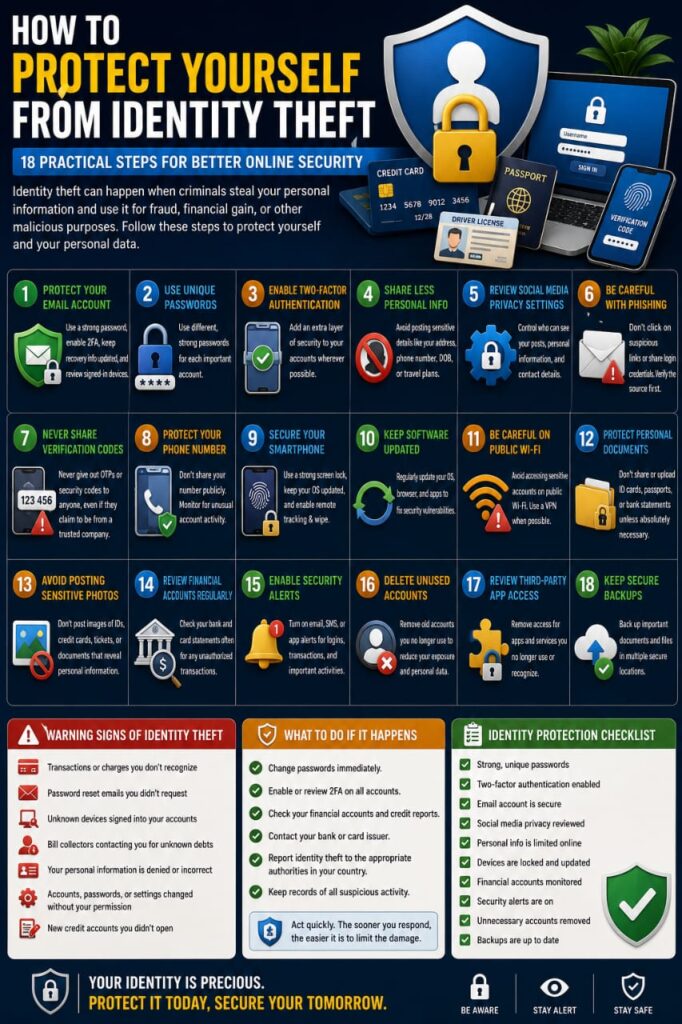
1. Protect Your Primary Email Account
Your main email account is often connected to many other services, including banking, social media, cloud storage, shopping accounts, and password recovery systems.
If someone gains access to your email, they may attempt to reset passwords for other accounts linked to it.
Protect your primary email with:
- A strong and unique password
- Two-factor authentication
- Updated recovery information
- Regular reviews of signed-in devices
- Careful monitoring of security alerts
Your email account should never use the same password as another important service.
2. Use Unique Passwords for Important Accounts
Password reuse is one of the easiest ways for a security problem on one website to affect several other accounts.
If a password is exposed during a data breach, attackers may try the same email and password combination on other services.
Create separate passwords for:
- Banking
- Social media
- Cloud storage
- Shopping accounts
- Business platforms
A reputable password manager can make it easier to generate and store unique passwords.
3. Enable Two-Factor Authentication
Two-factor authentication adds another verification step beyond your password.
This can reduce the risk of unauthorized access when a password is stolen or exposed.
Depending on the service, authentication methods may include:
- Authenticator applications
- Security keys
- Trusted-device approval
- Biometric verification
- One-time codes
Enable additional authentication on your most important accounts whenever it is available.
4. Share Less Personal Information Publicly
Information posted publicly can sometimes be used to make scams more convincing.
Think carefully before publishing details such as:
- Your full date of birth
- Your home address
- Your personal phone number
- Your workplace schedule
- Your family members’ private information
- Identification documents
- Travel plans
A single piece of information may appear harmless, but several public details combined together can reveal much more than expected.
5. Review Social Media Privacy Settings
Social media platforms often allow you to control who can view your posts, contact information, photos, profile details, and activity.
Review these settings periodically and decide whether your information should be visible to:
- Everyone
- Friends or followers
- Selected contacts
- Only you
Do not assume that older privacy settings will always remain the best choice after a platform changes its features.
6. Be Careful with Phishing Messages
Phishing is commonly used to steal account credentials and personal information.
A fraudulent message may pretend to come from:
- Your bank
- An email provider
- A delivery company
- A government organization
- A social media platform
- An online store
The message may create urgency by claiming that your account is locked, a payment failed, or immediate verification is required.
Instead of using an unexpected link, open the company’s official application or website directly.
7. Never Share Verification Codes
One-time passwords and verification codes can allow someone to complete a login or account recovery process.
If another person unexpectedly asks for a security code that was sent to your phone or email, do not provide it.
Only enter verification codes when you personally initiated the action and understand exactly what you are confirming.
8. Protect Your Phone Number
Your mobile number may be connected to banking alerts, password recovery, messaging applications, and two-factor authentication.
Avoid publishing your personal number unnecessarily on public websites or social media profiles.
If your phone suddenly loses service for no clear reason, contact your mobile provider using an official support channel, especially if the number is connected to important accounts.
9. Secure Your Smartphone
Your smartphone may contain access to email, financial apps, private messages, photos, and saved credentials.
Use:
- A strong screen lock
- Automatic screen locking
- Operating system updates
- Trusted applications
- Remote device-location features
- Device backup
If your phone is lost or stolen, act quickly to secure the device and important accounts.
10. Keep Your Computer and Browser Updated
Outdated software may contain vulnerabilities that have already been fixed in newer versions.
Regularly update:
- Your operating system
- Your web browser
- Security software
- Important applications
- Browser extensions
Remove applications and extensions you no longer need.
11. Be Careful When Using Public Wi-Fi
Public Wi-Fi can be useful, but unknown networks should be treated cautiously.
When possible, avoid highly sensitive activities such as:
- Online banking
- Changing important passwords
- Accessing confidential business systems
- Submitting identification documents
Your personal mobile data connection may be a safer option for sensitive activity while traveling.
12. Protect Personal Documents
Documents such as identification cards, passports, bank statements, tax documents, and utility bills can contain sensitive information.
Do not upload or send these documents unless there is a legitimate reason.
Before submitting a document online, verify:
- The website is legitimate
- The organization actually needs the document
- The connection is secure
- You understand how the information will be used
13. Avoid Posting Photos of Sensitive Documents
Photos can reveal more information than people realize.
A picture of a new credit card, boarding pass, employee badge, certificate, identification card, or official document may expose numbers, names, barcodes, or other sensitive information.
Before posting an image, carefully check everything visible in the background as well as the main subject.
14. Review Financial Accounts Regularly
Checking your financial activity can help you notice unusual transactions early.
Review:
- Bank transactions
- Credit or debit card activity
- Digital wallet transactions
- Payment app history
If you see a transaction you do not recognize, investigate promptly and contact your financial provider through an official channel when appropriate.
15. Enable Transaction and Security Alerts
Many financial institutions and online services allow customers to receive notifications for important activity.
Depending on the provider, alerts may cover:
- New logins
- Password changes
- Large transactions
- Card purchases
- New devices
- Account recovery attempts
These alerts can help you detect unusual activity sooner.
16. Delete Accounts You No Longer Use
Old online accounts may continue storing personal information long after you stop using them.
If an account is no longer useful, consider deleting it after saving anything you want to keep.
This can reduce the number of services holding your personal data and the number of passwords you need to manage.
17. Review Third-Party Account Access
You may have connected external applications to your Google, Apple, Microsoft, social media, or other major accounts.
Review these connections periodically.
Remove access for applications that:
- You no longer use
- You do not recognize
- No longer need your data
- You no longer trust
18. Keep Secure Backups of Important Information
Identity-related security incidents can sometimes result in lost access to files, accounts, or devices.
Maintain secure backups of important data such as:
- Personal documents
- Business files
- Photos
- Contacts
- Important records
For irreplaceable information, consider keeping more than one backup in separate secure locations.
Be Careful with Unexpected Phone Calls
Identity-related scams do not happen only through websites and email.
A caller may pretend to represent a bank, government agency, technology company, delivery service, or other organization.
Be cautious when an unexpected caller asks for:
- Passwords
- Verification codes
- Payment information
- Remote access to your device
- Sensitive personal details
If you are unsure, end the call and contact the organization using a verified number from its official website or app.
Watch Out for Fake Job Offers
Some identity scams are presented as employment opportunities.
A fraudulent recruiter may request sensitive documents, financial information, or money before a real employment relationship exists.
Research unfamiliar companies and be particularly cautious when someone offers unusually high income for very little work or pressures you to act immediately.
Be Careful with Online Giveaways
Fake prizes and giveaways may be used to collect names, addresses, phone numbers, payment information, or account credentials.
Be suspicious when you are told that you won something you never entered to win.
Legitimate prizes should not require you to reveal passwords or verification codes.
Protect Your Home Wi-Fi Network
Your home network connects many of the devices that access your personal information.
Basic Wi-Fi security includes:
- A strong Wi-Fi password
- A unique router administrator password
- Modern wireless encryption
- Updated router firmware
- Regular review of connected devices
What Should You Do After a Data Breach?
If a company reports that customer information was exposed, determine what type of information may have been affected.
Depending on the situation, useful steps may include:
- Changing the affected password
- Changing reused passwords elsewhere
- Enabling two-factor authentication
- Watching for phishing messages
- Reviewing account activity
- Monitoring relevant financial accounts
Be cautious with messages that appear after a public breach, because scammers may use the incident as an opportunity to send convincing phishing emails.
What Should You Do If You Suspect Identity Theft?
If you notice unauthorized activity involving your personal information, take action as soon as possible.
Start by identifying which accounts or information may have been affected.
Depending on the situation, you may need to:
- Change compromised passwords
- Secure your primary email account
- Sign out unknown devices
- Contact financial institutions
- Review recent transactions
- Save evidence of suspicious activity
- Follow the official identity-theft reporting procedures available in your country
Signs That Your Personal Information May Have Been Misused
Possible warning signs can include:
- Transactions you do not recognize
- Password reset emails you did not request
- Unknown devices signed into your accounts
- Unexpected account changes
- Messages sent from your account without your knowledge
- New financial activity you did not authorize
- Security alerts from unfamiliar locations
One unusual event does not always prove identity theft, but repeated suspicious activity deserves investigation.
Common Identity Protection Mistakes
Many privacy and identity risks begin with simple habits.
Common mistakes include:
- Reusing passwords
- Publishing too much personal information
- Sharing verification codes
- Ignoring security alerts
- Leaving old accounts active
- Opening phishing links
- Uploading sensitive documents to unknown websites
- Using weak device locks
- Ignoring financial statements
A Simple Identity Protection Checklist
Use this checklist to review your personal security:
- Secure your primary email account
- Use unique passwords
- Enable two-factor authentication
- Review social media privacy settings
- Limit public personal information
- Protect your smartphone
- Keep software updated
- Review financial activity
- Enable important security alerts
- Delete unused accounts
- Review third-party app access
- Back up important information
Frequently Asked Questions
What is identity theft?
Identity theft generally involves the unauthorized use of another person’s personal information for fraudulent or deceptive purposes, such as accessing accounts or conducting financial activity.
Can identity theft happen only through the internet?
No. Personal information can also be exposed through stolen documents, fraudulent phone calls, lost devices, physical mail, or other offline methods.
Does a strong password prevent identity theft?
A strong password is an important security measure, but it is only one layer of protection. Two-factor authentication, privacy controls, secure devices, and careful monitoring are also important.
Should I share my date of birth on social media?
Consider whether publishing your full birth date is necessary. Limiting unnecessary personal details can reduce the amount of information publicly associated with your identity.
What should I do if I receive a suspicious security alert?
Avoid clicking unexpected links. Open the official application or website directly and review the account activity there.
What is the easiest way to improve identity protection?
Start by securing your primary email, using unique passwords, enabling two-factor authentication, and reducing the amount of personal information you share publicly.
Final Thoughts
Protecting your identity is an ongoing process rather than a single security setting.
Strong passwords, two-factor authentication, secure devices, careful information sharing, financial monitoring, and awareness of phishing attempts all work together to reduce risk.
Take a few minutes to review your most important accounts and personal information today. Small security improvements can help protect your identity, money, privacy, and digital life from many common threats.